Oracle Health Redwood Design System Spectra Ambulatory Care

Physician Daily
Organizer

A physician seeing 25 patients a day does not have an information problem. They have a clarity problem. This is how Oracle Health solved it.
Role
Principal UX Designer
Platform
Redwood Design System · Oracle Health · Oracle Fusion HCM
Scope
Interaction · Accessibility · Component Design
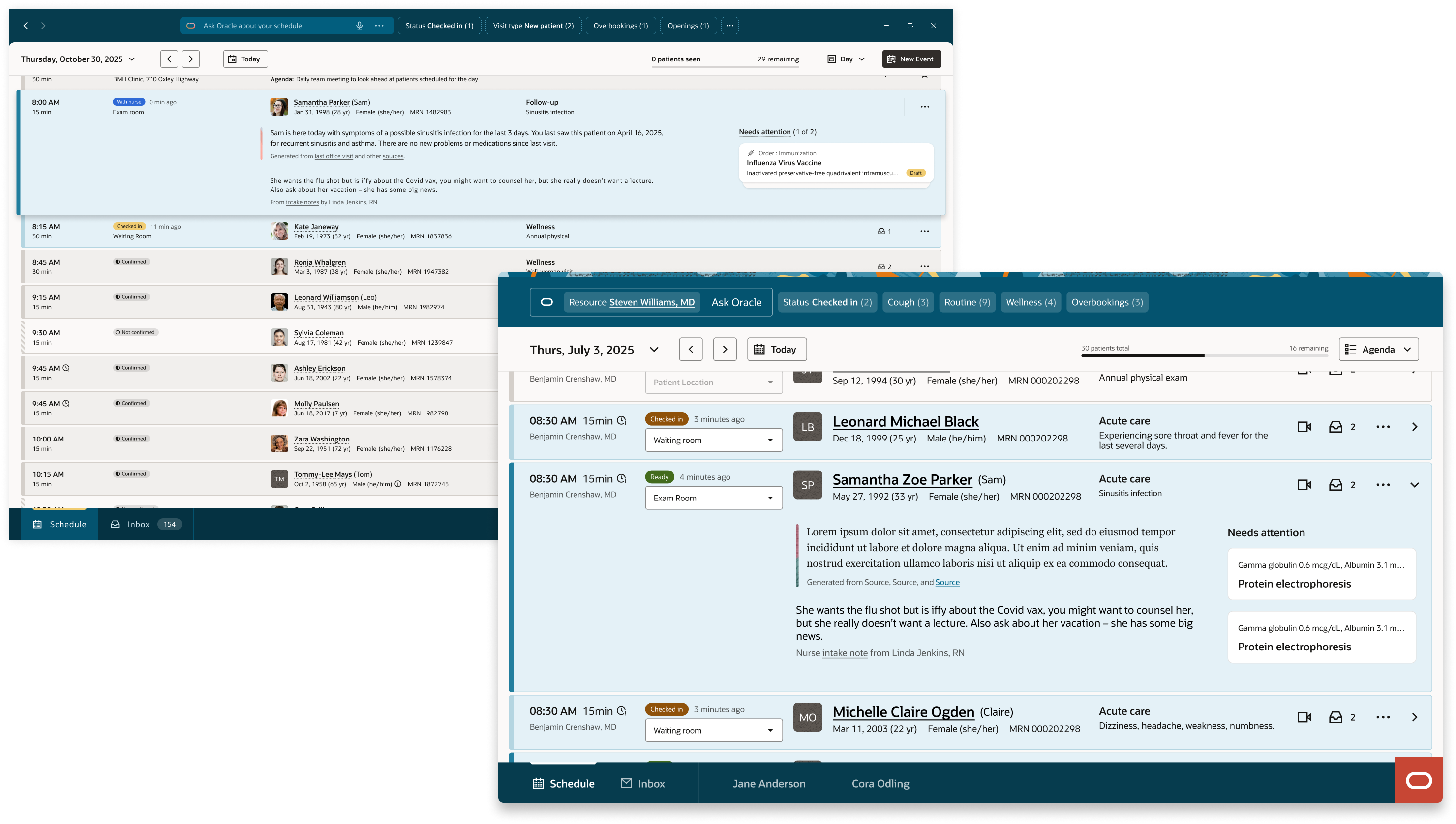
Hero image: the physician daily organizer interface showing the day view and the AI brief at the top, which surfaces critical information about the day's schedule and any priority messages that arrived overnight.

A clarity problem, not an information problem.

The entry point is an intelligent summary of the day. "25 patients scheduled today. 1 opening and 1 overbooking. You received 4 priority overnight messages you may need to follow up on today." That paragraph replaces three tabs and two tools. Below it, the day structures itself: clinic huddle, morning patient block broken down by visit type, grand rounds at a different location with travel time surfaced automatically, afternoon block. The AI filter bar surfaces what needs attention before the physician goes looking for it.

I was the principal interaction designer responsible for experience architecture, list view component design, accessibility strategy, and the cross-platform contribution that carried this work from Oracle Health into Oracle Fusion HR. I collaborated with product, engineering, a physician advisory group, and a non-sighted designer colleague whose input shaped the most consequential decision in the project.

25
Patients a physician sees daily in a typical outpatient schedule
4
Questions answered at a glance: When, Where, Who, Why
2
Oracle platforms served by one shared component architecture
1
Accessibility insight that changed the entire interaction model

The day as  a living timeline.

The design follows the cognitive sequence a physician actually uses: When is my next appointment? Where is it? Who is the patient? Why are they here? That order, every time, across every view.

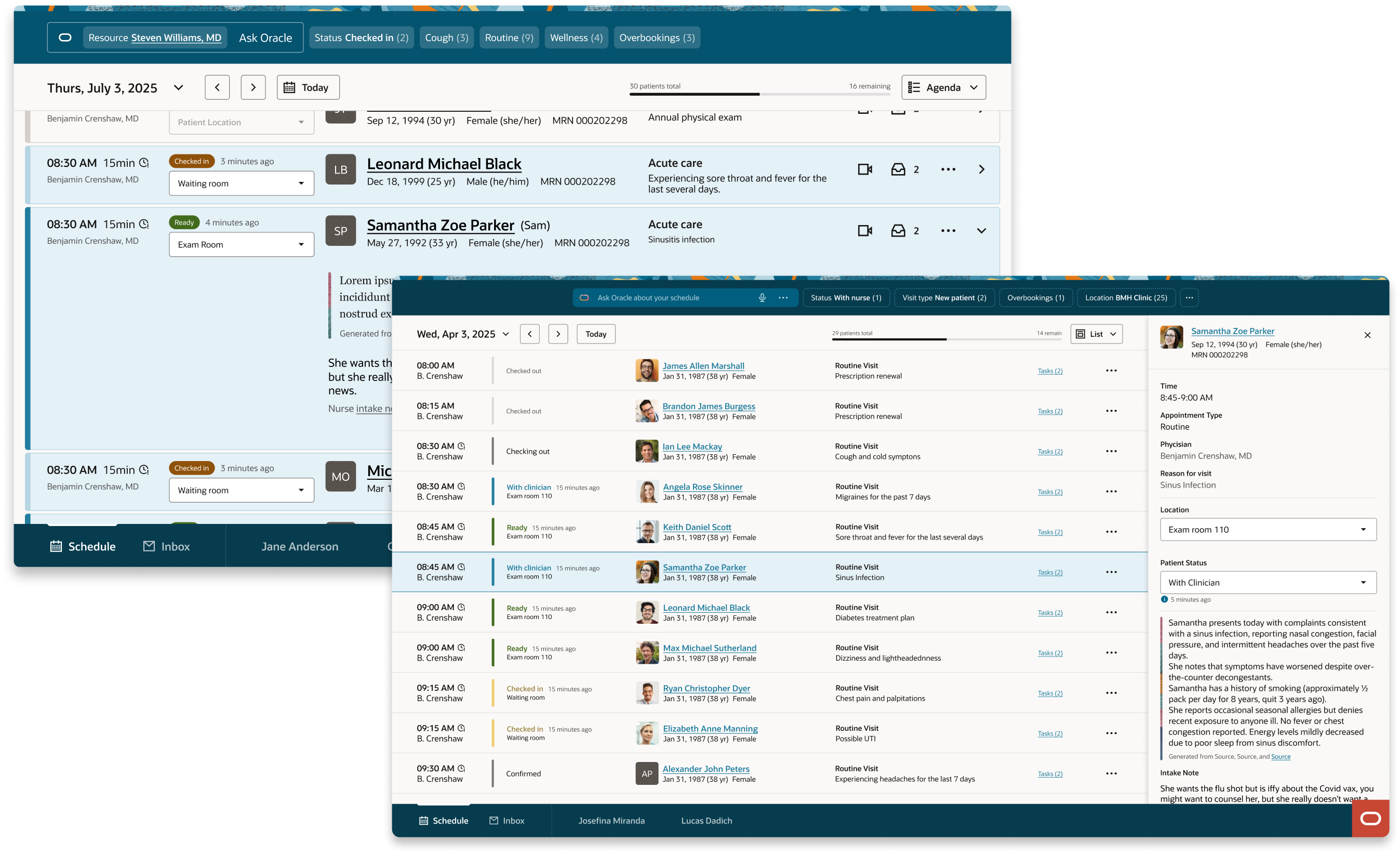
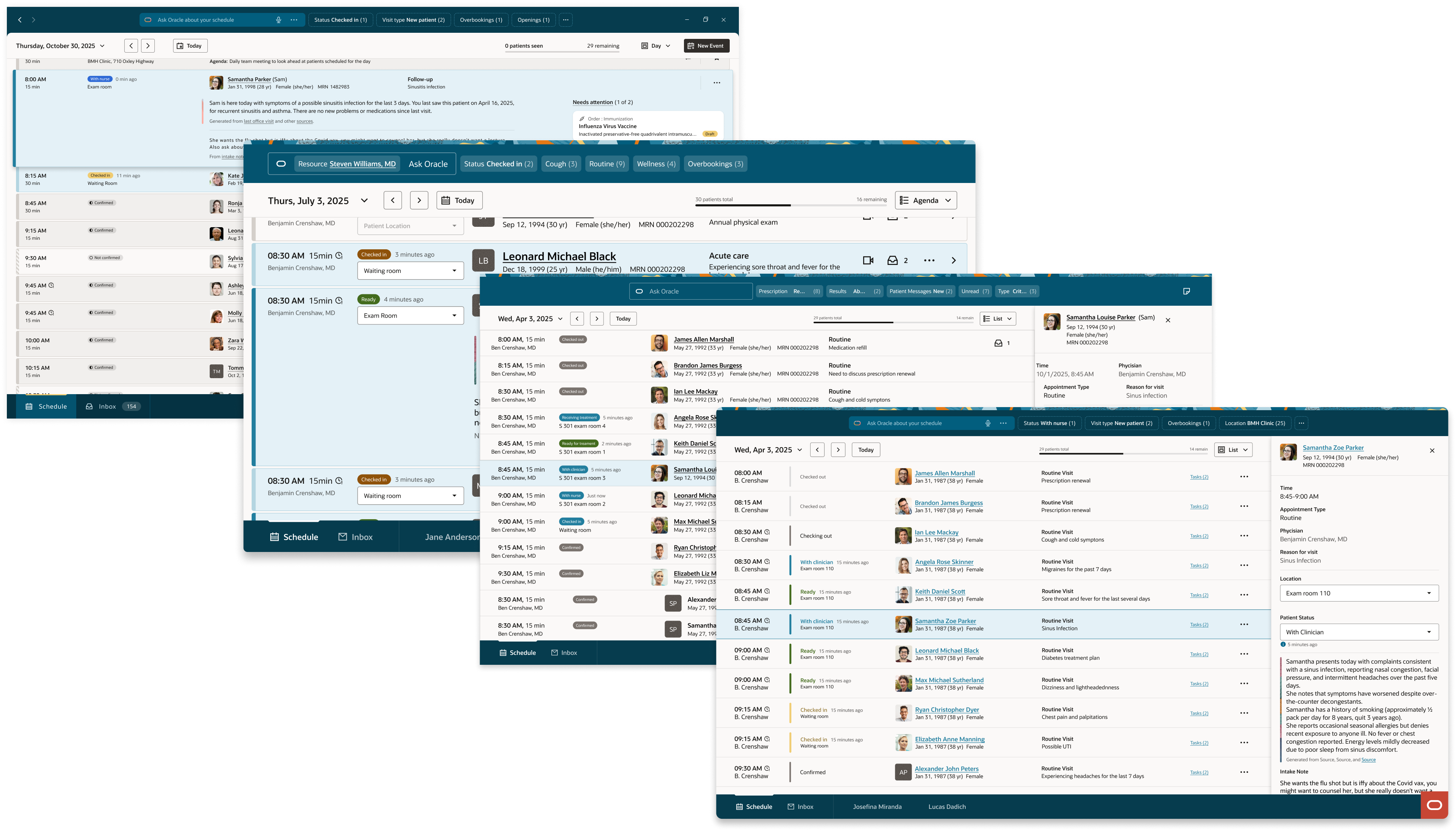
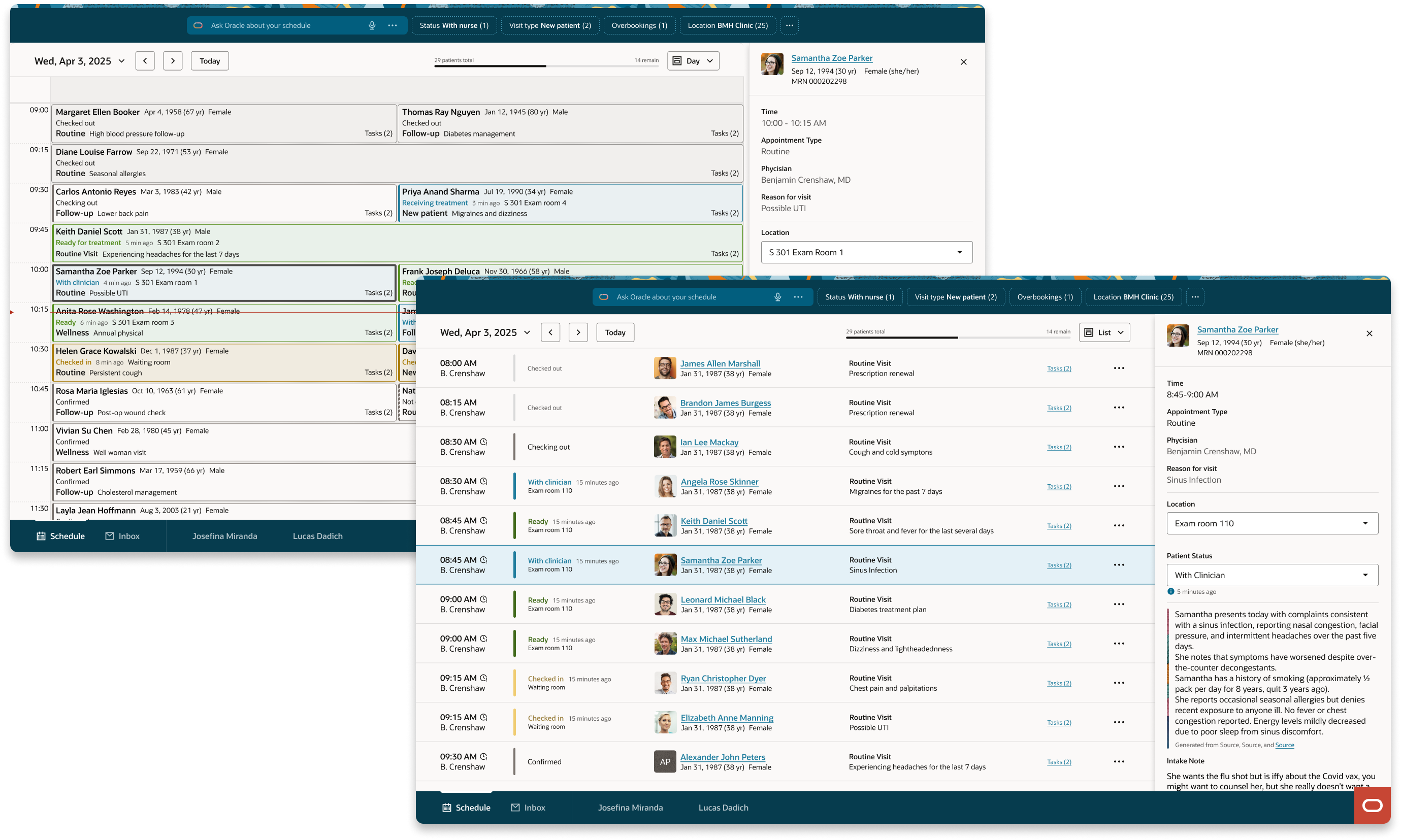
Day view — the Outlook calendar convention physicians already know. Appointments slot into time blocks, concurrent patients appear side by side, status is visible without any expansion or interaction.

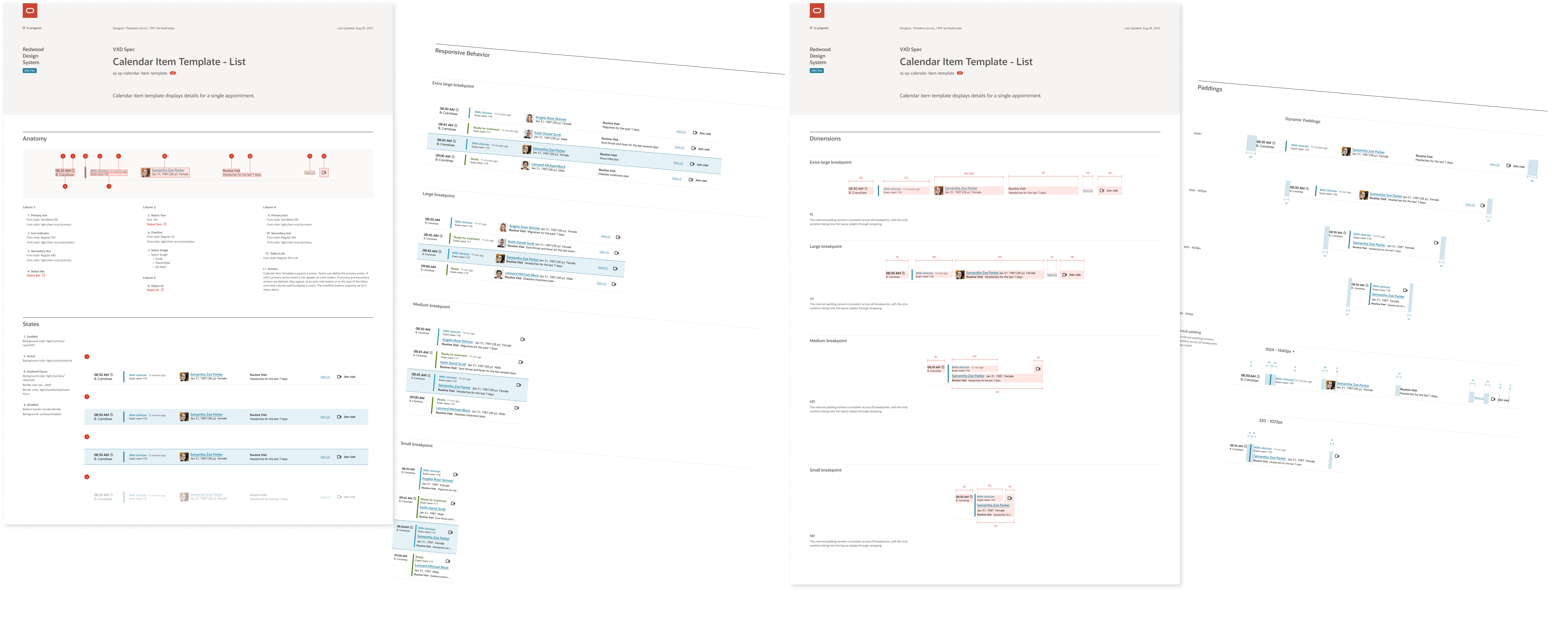
List view — designed for rapid sequential scanning. Every row carries the same information in the same position: time, status badge, patient identity including preferred name and pronouns, visit type, chief complaint, message indicator. Nothing expands. The rhythm is constant regardless of how many patients are scheduled.

Detail drawer — selecting any row opens the drawer without displacing the list or grid. Patient photo, appointment time, reason for visit, location and status (both editable), AI-generated patient summary with sourced references, nurse intake note, pending clinical tasks. The drawer behaves identically in both views. Learn it once, know it everywhere.

What the AI brief replaces
"25 patients scheduled today. 1 opening and 1 overbooking. You received 4 priority overnight messages you may need to follow up on today." That paragraph replaces three tabs and two tools.
Day view: the familiar calendar convention, with status surfaced without requiring any interaction.
List view: rapid sequential scanning — every row carries the same information in the same position: time, status badge, patient identity including preferred name and pronouns, visit type, chief complaint, message indicator. Nothing expands.

Detail drawer in list view — no list displacement on open.

Day view: rapid sequential scanning — every row carries the same information in the same position: time, status badge, patient identity including preferred name and pronouns, visit type, chief complaint, message indicator. Nothing expands.

Detail drawer in day view — no list displacement on open.

The decision that shaped the component.

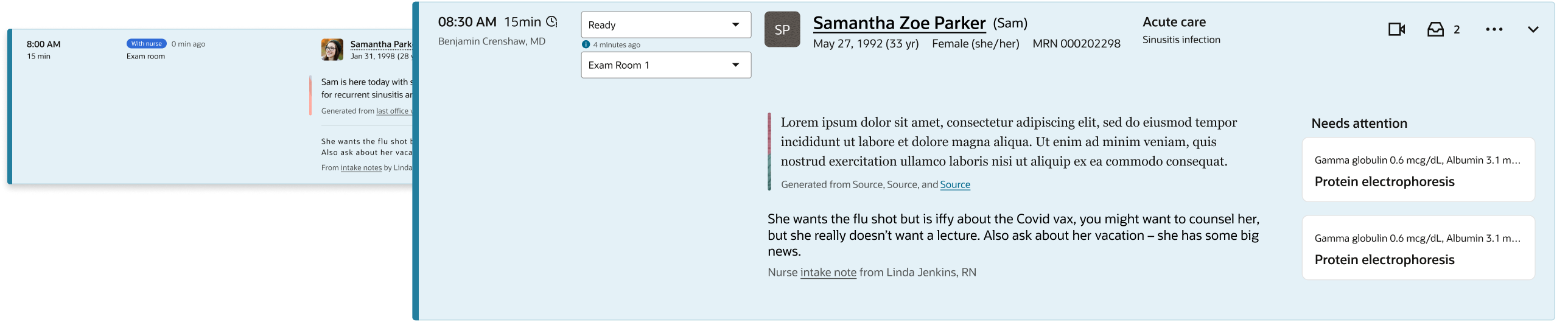
The original direction was a fisheye expansion model. Selecting a patient row would expand it inline, revealing AI summary, nurse notes, and pending tasks without navigating away. On the happy path it was elegant.

Aspirational fisheye expansion model — happy path: the selected row expands inline to reveal critical context without navigating away from the list.

The original inspirational direction: inline expansion. Elegant with one row open.

Aspirational fisheye expansion model — heavy anatomy state: the expanded row with full clinical content loaded, visually overwhelming and introducing dozens of focusable elements that destroyed keyboard tab order before reaching the next patient.

The original buildable direction: inline expansion. Overwhelming with full content loaded.

As interactions were added, the expanded state became visually overwhelming. More critically, it broke the accessibility model. For a sighted physician, a crowded row is an inconvenience. For a non-sighted user navigating by keyboard, it is a wall. Tab navigation through an expanded row meant traversing dozens of focusable elements before reaching the next patient.

"Lists are efficient for daily screen reader usage because they are linear. Variable-depth expansion introduces variable tab stop counts, and sequential navigation becomes unpredictable."
Non-sighted designer colleague, accessibility review session

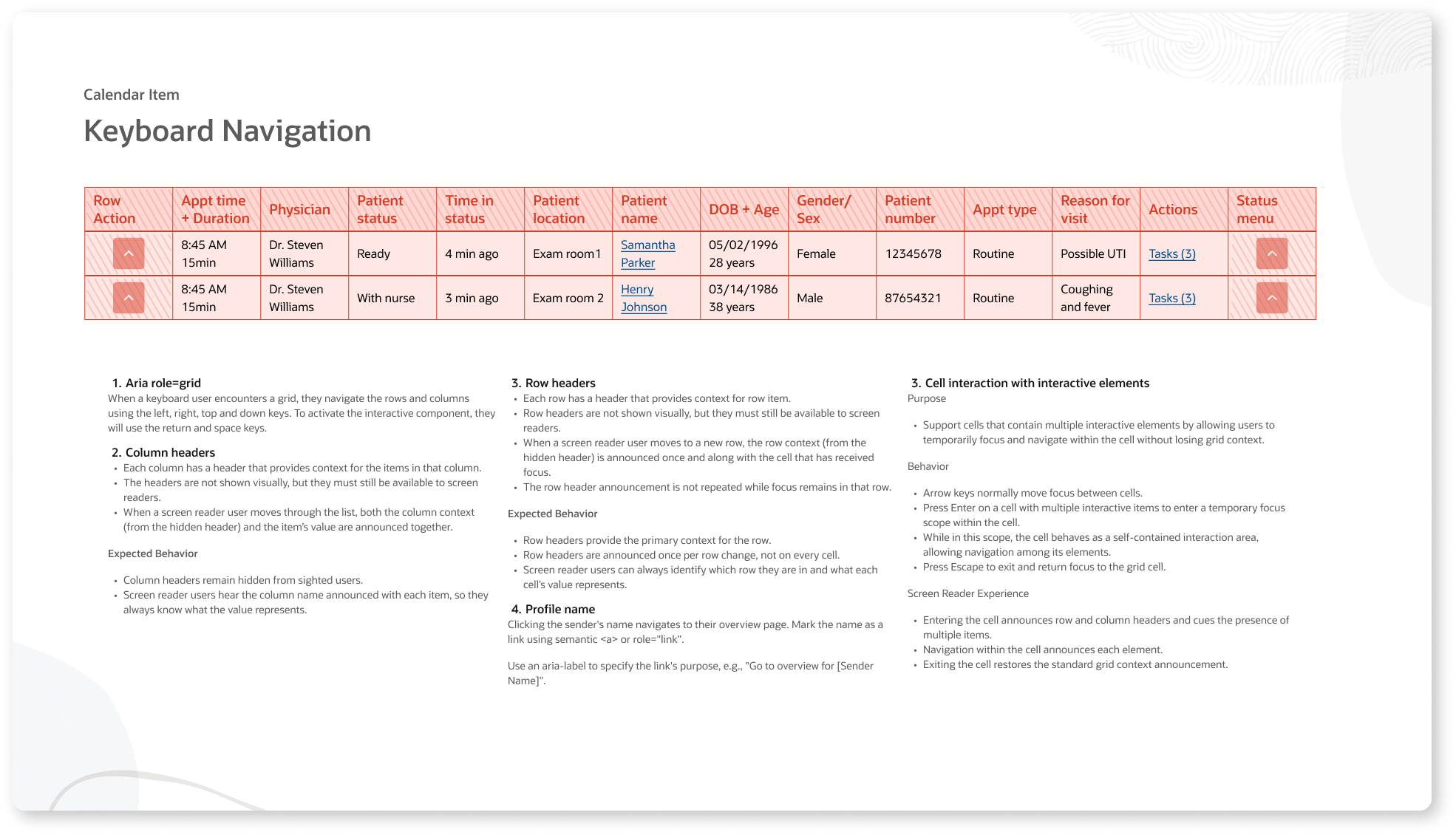
Her recommendation was to remove expand/collapse from the list entirely and treat detail context as a separate navigable destination — enter to go in, escape to return. We validated this by modeling the component as a pure semantic datagrid, stripping all visual design to confirm the column structure could support efficient arrow-key navigation. The final list view is a direct result of that session.

Datagrid semantic model — keyboard navigation structure: the component modeled as a pure semantic datagrid, all visual design stripped to validate that the column structure supports efficient arrow-key navigation before any visual work was applied.

The semantic datagrid model: structure validated before visual design. Accessibility architecture first.

Evaluation criterion Fisheye expansion Drawer model
Sighted scanning Fast with one row open Always fast
Multiple patients open Chaotic No degradation
Keyboard navigation Tab order broken Linear, predictable
Screen reader Context lost in expansion Consistent structure
Cognitive load Visual weight varies by state Uniform density

Designed once.
Deployed twice.

When Oracle Fusion HR needed a recruiting scheduling component, no significant accommodation was required. Their data mapped directly into the structure clinical had already validated.

Time and duration. Status badge. Candidate name and interview type. Requisition identifier. The column structure is identical. The data is different. The experience is the same. A component designed correctly for one domain serves another without modification.

HR recruiting list view: the same component, a different data domain. Time and duration. Status badge. Candidate name and interview type. Requisition identifier.

Oracle Fusion HR list view: the same component, a different data domain.

HR recruiting day view: the same component, a different data domain. Time and duration. Status badge. Candidate name and interview type. Requisition identifier.

Oracle Fusion HR day view: same structure, recruiting context, no redesign required.

The principle that proved out
A component designed correctly for one domain serves another without modification. The column structure is identical. The data is different. The experience is the same.
Let's talk about your
next big idea.

I'm currently open to new design leadership roles. Whether you're building something ambitious or improving what you already have, I'd love to connect.

Get in touch